How I Actually Use AI
This started as something I built to walk people through in a real conversation — coffee, a notebook, thirty minutes. I still use it that way. But I also wanted a version you could just read on your own. So it's both things at once: an article, and a set of questions I'd ask you if we were sitting down together.
I run Claude Cowork on Tiago Forte's PARA method, everything filed under one shared project code, one "Constitution" file governing all of it. That's saved me real hours on the boring stuff — invoices, batch Jira updates — and let me build things I never had the time or know-how to build before. None of that's actually the point, though. The point is what you do with the time it buys back.
Where are you at?
Before I tell you anything, I want to know where you're standing. Because "getting started" means something totally different depending on the answer. I'm not testing you. This just tells me where to point.
Here's where I'd start, whether we're talking face to face or you're just reading this on your own:
- What do you already know about AI tools?
- Do you know the difference between the models? Or what a large language model even is?
- Have you heard the word harness? (No worries if not.)
- Are you using any of this day to day right now, or is this a from-scratch conversation?
Why are you even asking?
People come to me as "the AI guy," and honestly I laugh a little, because I feel pretty inadequate about my own knowledge most days. But the question behind the question is usually the important part. What do you actually think this could help with? What's the thing that made you want to grab coffee?
- What's eating your time right now?
- Where do you feel stuck, or like there's got to be a better way?
- What do you think Claude could do for you? (Even if you're not sure.)
The "so what"
Here's the thing I care about most, and the thing most people skip. Yeah, you can create more, faster, more automated. So what? More toward what?
For me it's showing up less stressed at home. Being more present because I'm not still untangling a budget at the dinner table. It's the ability to help more people, to show up well for the partners I work with, to build things I genuinely never had the time or the knowledge to build before. It can't just be about money, or doing things for the sake of doing things. Figure out your so-what first. Everything else is downstream of it.
What would more bandwidth actually unlock for you?
Stuff I've actually built
Let me show you real things, not hypotheticals. There's a useful frame here I borrowed from the AI Daily Brief (more on them below): efficiency AI (doing what you already do, faster) versus opportunity AI (things you were never going to do at all, because you didn't know how or it wasn't possible). Most of my early wins were efficiency. The fun stuff is opportunity. This list grows as I build more — check back.
Invoice processing
Drop in a receipt. It reads it, allocates it to the right event, flips planned to actual, files and renames it, and drafts the email to ops.
Master markdown + change log
Every project has one brief: attendance, goals, spend, schedule. Anything that changes updates the brief and logs the change.
Jira in batches
"Push these due dates." Updates a whole cohort of tickets at once. Tiny thing. Adds up fast.
Salesforce dashboard
Talked through dedup logic for multi-lead accounts. Now I can drill into events and compare year over year. (Still workshopping, that's the point.)
Interview insight skill
Feeds transcripts, pulls insights on a specific problem, especially the ones I wouldn't catch myself. Aggregates themes over time.
Tools on the travel site and here
A restaurant finder on www.ericchurchtravel.com, and Booth Studio on this site. Things I never had the time or know-how to build before.
How I set up Claude Cowork
None of those wins happen without the scaffolding, and the scaffolding came first. I run everything in Claude Cowork on Tiago Forte's PARA method: Projects, Areas, Resources, Archive. (This isn't a Cowork-only trick — the same structure works in any AI tool that can read a folder of files. Cowork's just what I use.) Then there's one thing that ties it together: every project shares the same short code everywhere — email folder, files, notes. I call it the project code, and it means everything for one event is findable across every tool in about five seconds. I use the exact same trick in my inbox — I wrote about that system separately, since it's really the same PARA structure with no AI involved at all.
I work out of one project
I borrowed this from Jeff Su. Think of your global instructions like the U.S. Constitution, and each project like a state. When you're in Tennessee, the Constitution still applies. So I'm always working "within the United States." Inside a specific campaign folder, Claude sees that folder's context but stays aware of the global instructions above it.
Here's the actual folder structure
I figure the easiest way to show this is to just show it. Three screenshots, top down.
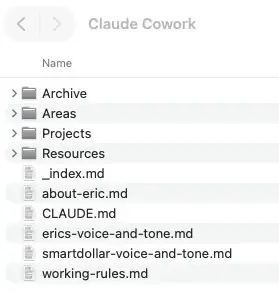
This is what you see the moment you open my project. The four folders are the PARA structure: Archive, Areas, Projects, Resources.
The files sitting next to them are the context Claude always has access to, no matter what project I'm working in. CLAUDE.md is the Constitution. _index.md (underscore on purpose, so it sorts to the top) is the map I keep mentioning. The rest is who I am, how I sound, and the rules I work by.
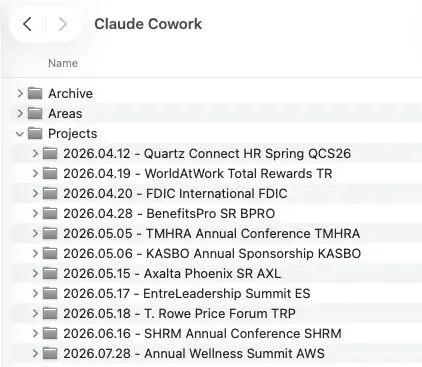
Open Projects and this is what you get. Every folder follows the same pattern: date, event name, short code at the end. The codes (QCS26, SHRM, TMHRA, AXL, AWS) are the project codes I keep talking about.
That same code shows up in my email folder, my notes, my files. Everywhere. It's the thread that ties one event together across every tool I use, and it's why I can find anything in five seconds.
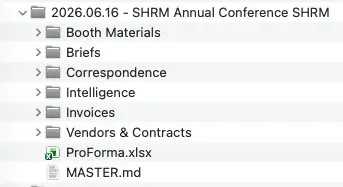
Drill into any event and the subfolders are the same: Booth Materials, Briefs, Correspondence, Intelligence, Invoices, Vendors & Contracts. That's by design. Standardized structure means Claude always knows where to put things and where to look.
The two files at the bottom matter most. ProForma.xlsx is the budget. MASTER.md is the brief plus the change log we talked about, the single source of truth for the event.
Two layers of instruction
Worth being precise, because I use "global instructions" loosely. There's the settings-level instruction inside Claude (mine is tiny: who I am, how things are structured, where to find the details). And there's the CLAUDE.md at the top of my folder, which holds the real instructions plus voice and tone. That CLAUDE.md is the Constitution everything references.
What's connected (and what isn't)
Jira: yes, genuinely useful. Outlook: barely, I'm close to inbox zero most weeks. Chrome: mostly for research, comparing one event to others. Being honest about what I don't use is part of the point.
What I ask AI
These aren't secret prompts. They're just what a second brain sounds like day to day. The specifics are mine — booth numbers, SHRM, invoices — but that's the point of showing you: swap in your own nouns. Every one of these is really just "you already know this about my work, so tell me." What would that sound like for what you do? That's the wheel-turning I'm actually going for with this whole page.
Resources
A lot of what I know, I picked up from other people. Exposing yourself to what others are doing is what sparks ideas for your own world. This is my actual list — real people, real links — and I'll keep adding to it as I find more. Bookmark this section directly if you just want to come back for that.

The most practical exploration of Claude I've found. Real use cases, ways to structure things. Great starting point.

Productivity-focused, deep tech bench. His Constitution-and-states analogy is the one I borrowed for my whole setup.
Okay. So what now?
I don't want this to be a nice read you forget by Friday. So before you go:
One thing
What's one thing you'll actually try this week? Not ten. One. Pick the annoying, repetitive task that came to mind while you were reading this, and just walk through it once.
And the honest question I leave everyone with: if the tool went away tomorrow, what would you still be able to do? That tells you whether you're building a system, or just a dependency.
Tell me how it goes — email me. I'm genuinely curious.